
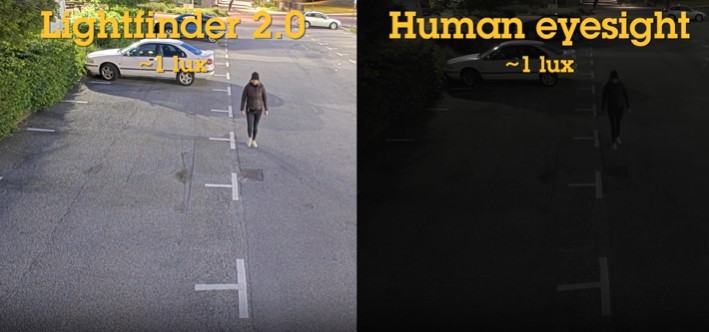
Security footage is only useful if it clearly shows what happened. For many businesses, that can be challenging after hours, in parking lots, near building entrances, or in dimly lit areas where traditional cameras may produce dark, grainy, or blurry footage. Advanced low-light camera technology helps solve this problem by capturing clearer, more detailed images in difficult lighting conditions by providing high-quality color video and minimal motion blur, even in near darkness.
Why Low-Light Image Quality Matters
Many security incidents happen in areas where lighting is limited. Parking lots, loading docs, exterior perimeters, warehouses, hallways, and entry points may not have bright, consistent lighting throughout the day and night.
Poor visibility can make it harder to identify people, vehicles, clothing, objects, or key details during an incident. Color video and low light scenes can be critical for identifying people, vehicles, and events more accurately during security review [1].
What Makes Low-Light Video Difficult?
Security cameras need light to produce a usable image. When there is less light available, a camera may slow its shutter speed so the sensor has more time to collect enough light. However, slow shutter speeds can cause moving people or vehicles to appear blurry because the object changes position while the image is being captured [2].
Cameras may also increase gain to brighten the image, but this can create visible noise or grain. If the image becomes too noisy or blurry, important details may be lost.
How Lightfinder Technology Improves Visibility
Surveillance Secure utilizes Axis Lightfinder technology which is designed to improve image quality in very low-light scenes. Lightfinder combines highly sensitive sensors, quality optical components, and tuned image processing to reduce noise and produce clear images in near darkness [3].
This allows supported cameras to capture more detail with less available light. Instead of switching too quickly to black-and-white night mode, many cameras with Lightfinder can remain in color mode longer, preserving details that may help identify a subject or vehicle.
Why Reduced Motion Blur Matters
Motion blur is one of the biggest issues in low-light surveillance. A still scene may look clear, but once a person walks through the frame or a vehicle passes by, the footage may become difficult to use.
Axis Lightfinder supports shorter exposure times in low-light conditions, helping reduce blur and capture sharper video of moving objects [3]. This can make a major difference when reviewing footage for faces, clothing, license plates, vehicle movement, or incident timelines.
When Low-Light Cameras Are Most Useful
Low-light cameras can be valuable in many commercial and institutional environments, including:
- Parking lots and garages
- Building entrances
- Warehouses and loading docks
- Schools and campuses
- Apartment communities
- Exterior perimeters
- Dim indoor corridors
- Retail and office properties
Camera replacement still matters. Camera angle, mounting height, weather exposure, and field of view all affect how well a surveillance camera performs [4]. Choosing the right camera and configuration for the environment is essential.
Improve Visibility When the Quality & Detail of Your Security Footage Matters Most
Low-light surveillance technology can help businesses capture clearer, more usable footage when visibility is limited. With better color detail, reduced motion blur, and stronger performance in near darkness, advanced cameras can improve security monitoring and incident review.
Surveillance Secure can help your organization choose and install camera solutions designed for your property’s lighting conditions and security goals.
Contact Surveillance Secure today to explore commercial low-light surveillance camera options that help capture more detail when it matters most.
Sources:
- https://www.axis.com/dam/public/38/88/ef/lightfinder%3A-outstanding-performance-in-difficult-light-conditions-en-US-342452.pdf
- https://help.axis.com/en-us/troubleshooting-image-quality
- https://www.axis.com/solutions/lightfinder
- https://blinksandbuttons.net/where-to-place-cameras/


 Virginia DCJS Private Security Services ID #11-6085